I Tried A Free AI Background Remover for My Snail Mail Business
As you all know, I’ve been diving deeper into the creative world lately with my new snail mail club — making stickers, bookmarks, and (hopefully, one day) full stationery sets.
(I talked about it at length, here and here)
Last week I photographed one of my bookmark designs on my dining table. It looked lovely… apart from the crumbs, pen, and mug I’d forgotten were in the background. Not to mention the cat’s tail and my daughter’s little, curious hands poking the bookmark!
And one thing nobody warns you about is just how many product images this hobby-turned-side-hustle demands! Every sticker sheet needs a clean, pretty mockup. Every bookmark photo needs the cluttered desk removed from the background. It never ends. -_-
And if you sell on Etsy or run a print-on-demand shop, it’s the same story at scale — there are always twenty more images sitting in a folder judging you.
What tools do most of us use for this? They live in the cloud. Which means uploading every. single. file. Waiting on your wifi.. Again and again and again.
That’s why I was curious when Creative Fabrica launched a desktop app with a free local AI background remover built in — as in, it runs on your computer, no uploads, no credits.
Specificallly, I needed a background remover for Mac computers, which is what I have.
Free AND local? Usually, you get one or the other. So I installed it. (And Cricut and sublimation folks, this one’s for you too — you need transparent PNGs constantly, and paying per cutout gets old fast.)

What is Creative Fabrica Studio Desktop?
Creative Fabrica Studio Desktop is a Windows and Mac app that lets you use Creative Fabrica Studio (their design tool) alongside local AI models installed on your computer.
After a model is installed, supported tools — like background removal and image upscaling — can run directly on your machine rather than relying solely on cloud processing.
The app itself is free. No paid account, no credit card.
The local AI tools — background removal, upscaling, image generation, and text-to-speech — don’t have a credit meter at all.
So, here is what it looks like after I installed it on my desktop for free. You get access to the tools immediately.

Why local AI matters
If you’ve only ever used browser-based tools, “local” sounds like tech-bro trivia. But it actually changes a few things.
Here’s the easiest way to picture it: think about how Canva works.
Even in Canva’s desktop app, your image still gets uploaded to their servers, processed in the cloud, and sent back to you.
Creative Fabrica Studio Desktop flips that around — once a model is installed, the processing happens on your computer.
Your file never has to leave your machine, and supported tools can even run offline.
Why does that matter in practice?
- No uploading every image to a cloud tool. Your product photos and unreleased designs stay on your computer — great if you’re privacy-conscious.
- No credit system for supported local tools. The model runs on your hardware, so there’s no meter. If you clean up 40 listing photos a week, you’ll feel the difference.
- Great when you’re processing lots of images. The value compounds with volume.
- Slow internet stops being the bottleneck. After the model is installed, supported tools run on your machine.
- It’s built into the Creative Fabrica Studio workflow. Remove a background and keep designing — no bouncing between tabs and downloads.
Hands-on: cleaning up a product photo for my snail mail shop
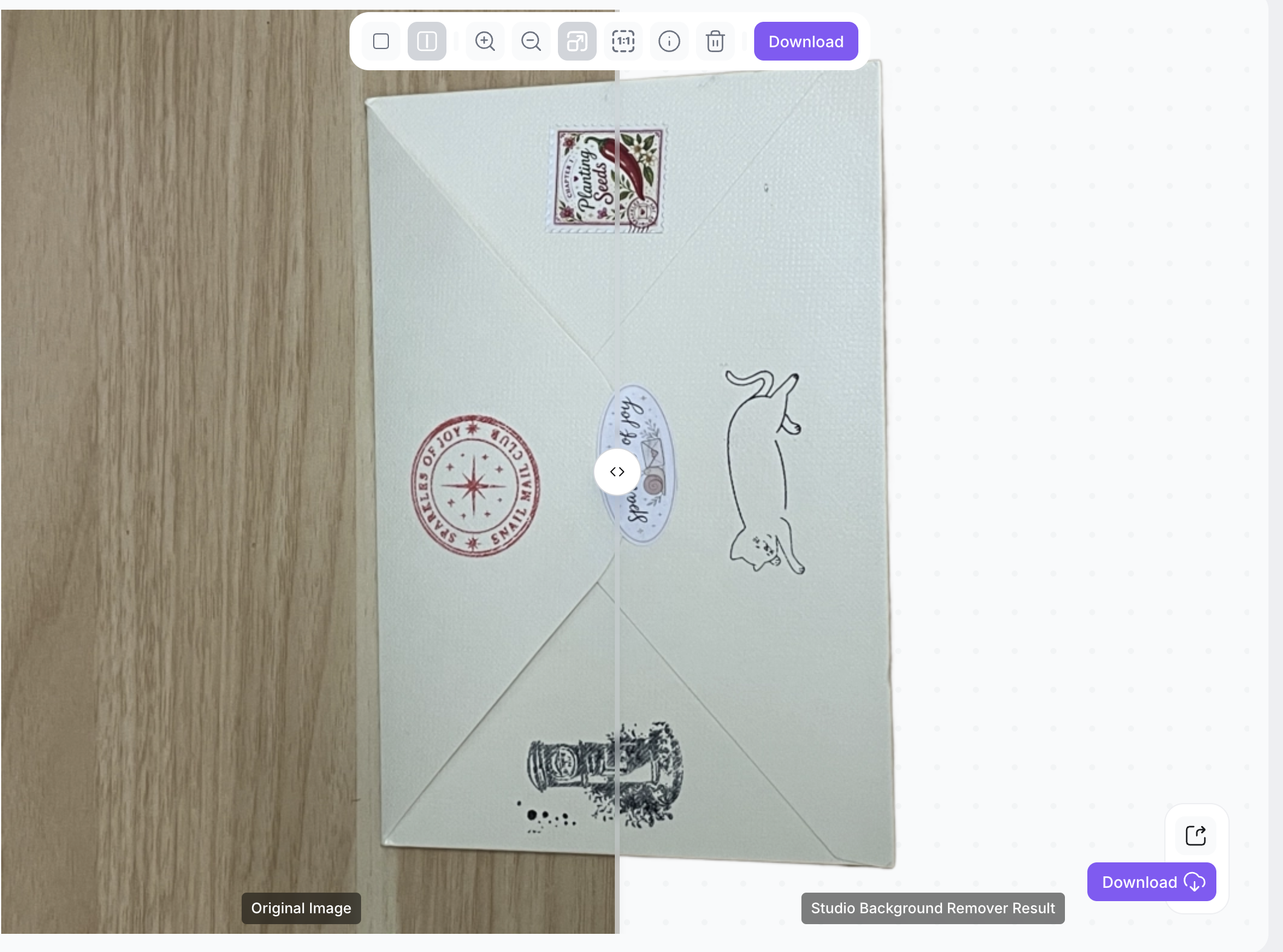
I grabbed a photo of my snail mail envelope that needed cleaning up, and the background removed, and put it through the wringer:
I clicked on the Free Models tab, then Background Remover

I was expecting it to take ages to remove the background (I’ve used plenty of AI tools before), but it only took a few seconds and did a surprisingly good job around the envelope’s edges.
This is the before and after result, nifty, eh!

Who is it best for?
Anyone who processes images in bulk:
- Etsy sellers with a backlog of listing photos to clean up
- Print-on-demand sellers upscaling designs so they don’t print blurry ones
- Cricut and sublimation crafters who live and die by transparent PNGs
- Designers and digital product sellers tired of the upload-download shuffle
- Snail mail club owners, like me ha!
If you remove one background a month, honestly, any free web tool is fine. This shines when you’ve got volume.
Pros and limitations
Pros:
- Free local AI tools with no credit system
- Works on both Windows and Mac
- Genuinely useful for background removal and upscaling
- Built into a real design workflow, not a standalone gimmick
- Your files don’t leave your computer (for the supported local tools)
Limitations:
- Local AI performance depends on your computer — an older laptop will chug, but mine didn’t have any delays.
- Models need to be downloaded before first use, which takes time and disk space
- Very old machines may be noticeably slower
- Some features may still require an internet connection or a Creative Fabrica account, depending on the workflow
I’d rather tell you that upfront than pretend it’s magic. It’s a good free tool, not a miracle — and how snappy it feels depends on what you’re running it on.
FAQ
Is Creative Fabrica Studio Desktop free?
Yes. Free to download and use on Windows and Mac, no credit card required.
Does the free AI background remover run locally?
After the model is installed, the background remover ran on my computer — not in the cloud.
Does it work on Windows? Does it work on Mac?
The free AI background remover can be used on both.
Can I use it as a background remover for Etsy product photos?
That’s basically the dream use case — no per-image cost means you can clean up your whole shop.
Can I use it for print-on-demand designs?
Yes — the upscaler is handy for pushing low-res designs up to print quality
Can I make transparent PNG files for Cricut?
Yes — the background remover outputs transparent PNGs, which is exactly what you need.
Is it an alternative to cloud background removers?
For supported local tools, yes — it does the same job without uploads or credits, though speed depends on your hardware.
Do I need an internet connection? Are my images uploaded?
You need the internet to download the app and the models. After that, the supported local tools ran on my machine.
Bottom line
If you touch a lot of images — Etsy, POD, Cricut, whatever — Creative Fabrica Studio Desktop is worth ten minutes of your time.
It’s free, it runs on your own machine, and it kills off the two most annoying parts of image cleanup: the upload step and the credit meter.
Download it, run one of your own photos through it, and see what you think!